Craving instant action? Dive into your favorite games instantly. Exciting tournaments, massive bonuses and fast withdrawals await. Experience the best version of everything you love!
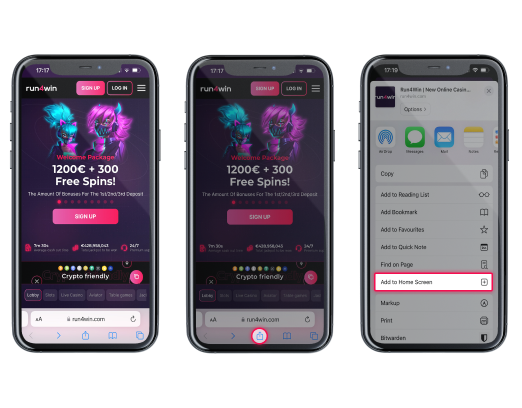
iOS Safari
1. Open Run4Win Casino in Safari browser on your iOS device
2. Tap the “Share” button
3. Scroll down and tap “Add to Home Screen.”
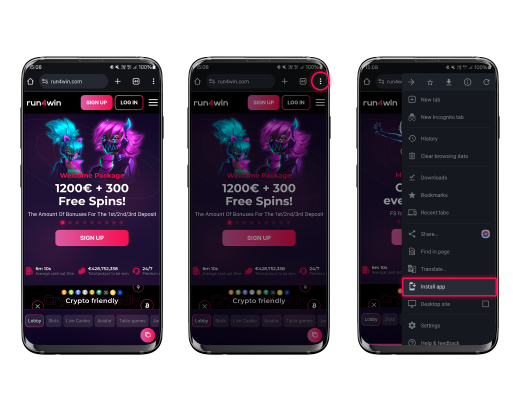
Android Chrome
1. Open Run4Win Casino in Chrome browser on your Android device
2. Click on “Three dots” on the top right
3. Click the “Install app” button and tap “Install.”
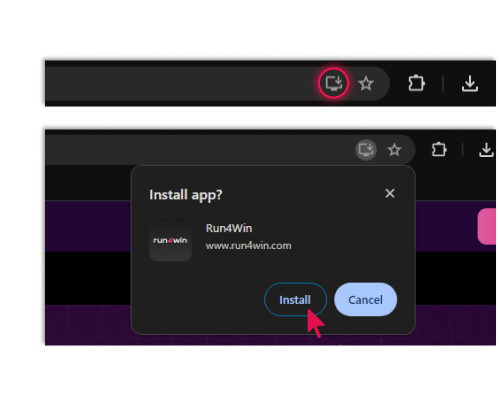
Chrome
1. Open Run4Win Casino in Chrome browser on your device
2. Click on “Three dots” on the top right
3. Сlick the “Install Run4Win Casino” button
4. Tap “Install.”
We use cookies to improve your experience. By using our website you are accepting our Cookie Policy.